
ACEMAGIC K1 vs M1: Which Mini PC Should You Pick?
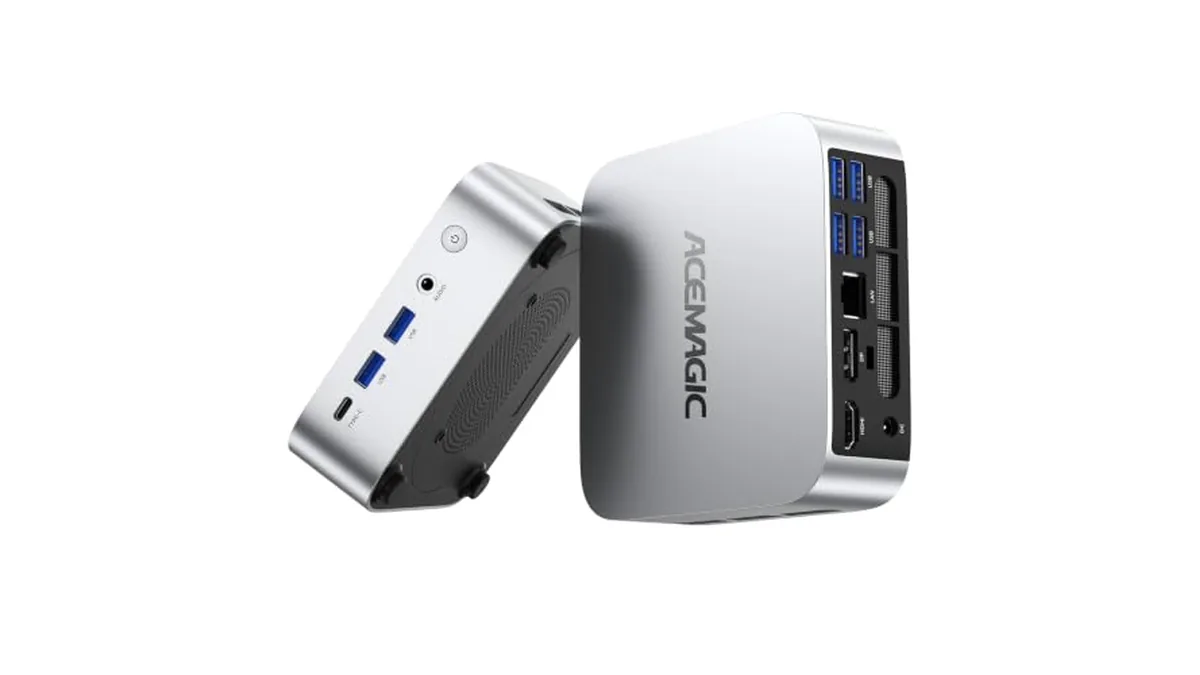
From the outside, the ACEMAGIC K1 and M1 are hard to tell apart. ACEMAGIC gives both the same 128.2 × 128.2 × 41 mm case, the same 19V 3.42A power adapter, Windows 11 Pro and three 4K video outputs. Inside, they're aimed at different people. The K1 with the AMD Ryzen Embedded R2544 is a four-core everyday machine with memory you can upgrade. The M1 runs an eight-core Ryzen 7 7735HS with Radeon 680M graphics, faster networking and soldered memory.
The easiest way to choose is by what you'll do with it. Below, each job gets a pick.
Job 1: A desk PC for documents, email and video calls
Pick: K1
Four cores and eight threads at up to 3.7 GHz handle office apps, browsers and calls without strain. Six USB-A ports leave room for a keyboard, mouse, webcam, printer and a couple of drives. The M1 does all of this too, but its extra graphics and cores would sit idle for this kind of work.
Job 2: A living-room media PC
Pick: either
Both have HDMI 2.0 and DisplayPort 1.4 rated for 4K at 60 Hz, plus a USB-C port that carries video. For streaming and local video files, the K1's Radeon Vega 8 graphics are enough. Choose the M1 here only if the same box will also play games on the TV.
Job 3: Casual gaming at 1080p
Pick: M1
This is the biggest gap between the two. The M1's Radeon 680M has 12 graphics cores at 2,200 MHz. The K1's Vega 8 has 8 cores at 1,300 MHz and is an older design. The M1's LPDDR5-5500 memory also helps, because integrated graphics borrow system memory. Expect older and lighter games at low to medium settings on the M1; the K1 is for very light titles only.
Job 4: Photo editing and the odd video project
Pick: M1
Eight cores and sixteen threads at up to 4.75 GHz against four cores at 3.7 GHz makes a real difference on exports, large photo batches and timelines. The 1 TB drive on the M1 is also a better starting point for a photo library.
Job 5: Fast home network or a NAS
Pick: M1, with one caveat
The M1 has 2.5 Gbps Ethernet and Wi-Fi 6 with Bluetooth 5.2. The K1 has Gigabit Ethernet, Wi-Fi 5 and Bluetooth 4.2. If you move big files to a NAS or have multi-gig internet, that settles it.
The caveat is drives. The K1 has two M.2 slots, and one of them takes SATA as well as NVMe drives, each slot up to 2 TB. The M1's two M.2 slots take NVMe drives only (PCIe 3.0 or 4.0), up to 4 TB in total, with no SATA support. If you have SATA M.2 drives to reuse, only the K1 accepts them.
Job 6: Adding memory later
Pick: K1
The K1 has two SO-DIMM slots that take up to 32 GB of DDR4-3200, and ACEMAGIC sells the R2544 K1 with 8 GB or 16 GB installed. The M1's 24 GB of LPDDR5 is soldered to the board, and ACEMAGIC states it can't be expanded. Twenty-four gigabytes is plenty for most home and office use, but it's the amount you'll have for the life of the machine.
Job 7: Lots of fast USB devices
Pick: M1
Both have seven USB ports in total, but the speeds differ. The K1 has six USB-A ports and one USB-C port, all at 5 Gbps. The M1 has two 10 Gbps USB-A ports on the front, four 5 Gbps USB-A ports on the back and a 10 Gbps USB-C port. For external SSDs, the M1's front ports are the ones you want.
The specs side by side
| ACEMAGIC K1 (R2544) | ACEMAGIC M1 (7735HS) | |
|---|---|---|
| Processor | Ryzen Embedded R2544, 4 cores / 8 threads, 3.35 to 3.7 GHz | Ryzen 7 7735HS, 8 cores / 16 threads, 3.2 to 4.75 GHz |
| Graphics | Radeon Vega 8, 8 cores, 1,300 MHz | Radeon 680M, 12 cores, 2,200 MHz |
| Memory | 8 GB or 16 GB DDR4, two SO-DIMM slots, up to 32 GB | 24 GB LPDDR5-5500, soldered |
| Storage slots | Two M.2 2280: one SATA or NVMe PCIe 3.0 x2, one NVMe PCIe 3.0 x4; 2 TB per slot | Two M.2 2280 NVMe (PCIe 3.0/4.0), up to 4 TB, no SATA |
| Video out | HDMI 2.0, DP 1.4, USB-C, each 4K 60 Hz | HDMI 2.0, DP 1.4, USB-C, each 4K 60 Hz |
| USB | 6 × USB-A 5 Gbps, 1 × USB-C 5 Gbps | 2 × USB-A 10 Gbps, 4 × USB-A 5 Gbps, 1 × USB-C 10 Gbps |
| Network | Gigabit Ethernet, Wi-Fi 5, Bluetooth 4.2 | 2.5 Gbps Ethernet, Wi-Fi 6, Bluetooth 5.2 |
| Size | 128.2 × 128.2 × 41 mm | 128.2 × 128.2 × 41 mm |
| Power | 19V / 3.42A | 19V / 3.42A |
One more detail for multi-monitor setups: ACEMAGIC's Japanese K1 page notes that with three screens connected at once, the K1 tops out at 4K 30 Hz. ACEMAGIC rates each M1 output at 4K 60 Hz.
Which K1 are we talking about?
The K1 name covers several builds. Our K1 Ryzen R2544 guide covers what the base chip can and can't do. Besides the R2544, ACEMAGIC sells the K1 with a Ryzen 3 7330U, a Ryzen 7 7730U and a Ryzen 7 7735HS. That last one uses the same chip as the M1, so the processor and graphics are a match. ACEMAGIC hasn't published the port and slot layout for those three K1 versions, so check the product page for networking, memory type and M.2 slots before you compare them with the M1.
The short version
If your PC will spend its life on documents, browsing and streaming, and you like the idea of adding memory later, the ACEMAGIC K1 is the sensible pick. If you want light gaming, faster editing or 2.5 Gbps networking in the same small box, go with the ACEMAGIC M1. For more graphics power than either, the ACEMAGIC X3 steps up to Radeon 780M. Our ACEMAGIC review covers the whole range, and if you need to change boot settings after setup, here's how to enter the ACEMAGIC BIOS.