
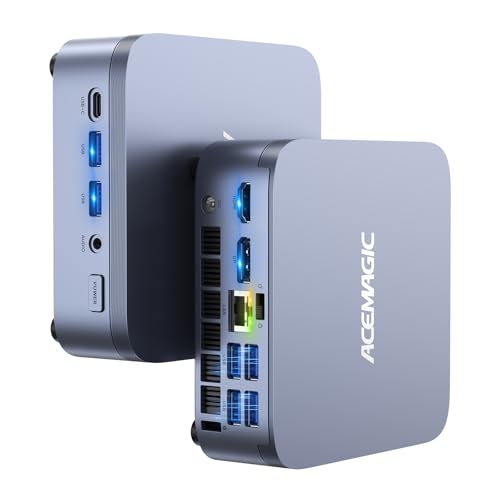
Verdict: The M5 is the most powerful ACEMAGIC mini PC in this lineup by core count. It puts Intel's Core i7-14650HX, a 16-core, 24-thread laptop-class HX processor, into a case ACEMAGIC lists at 128 × 128 × 41.3 mm. It suits people who compile code, run virtual machines, crunch spreadsheets or edit photos and want desktop-style multitasking without a tower under the desk. It is not a graphics-first machine: the processor relies on Intel UHD integrated graphics, so if games are the priority, the Radeon 780M-based X3 makes more sense.
Key specs
- Processor: Intel Core i7-14650HX, 16 cores (8 performance + 8 efficient) / 24 threads, 2.2 GHz base, up to 5.2 GHz, 30 MB cache
- Graphics: Intel UHD Graphics for 14th Gen processors, 16 execution units, up to 1.6 GHz
- Memory: DDR4-3200 in two SO-DIMM slots, up to 64 GB (see the memory note below)
- Storage: 1 TB M.2 2280 NVMe PCIe 4.0 ×4 drive; a second M.2 slot takes SATA or NVMe PCIe 3.0 ×4; up to 2 TB per drive, 4 TB total
- Displays: HDMI 2.0, DisplayPort 1.4 and USB-C (DP 1.4), each listed at 4K 60 Hz, for three screens
- Ports: two 10 Gbps USB-A on the front, four 5 Gbps USB-A on the back, one 10 Gbps USB-C, Gigabit Ethernet, 3.5 mm audio
- Wireless: Wi-Fi 6E and Bluetooth 5.2
- Power: 19 V / 6.32 A adapter (roughly 120 W)
- Size: 128 × 128 × 41.3 mm
- System: Windows 11 Pro; ACEMAGIC also lists Ubuntu and Linux as compatible
What stands out
Real core count in a small box. Most mini PCs in this price range use 8-core chips. The i7-14650HX has 16 cores and 24 threads, which helps most with work that splits across many threads: code builds, batch photo exports, video encodes that run on the processor, and several virtual machines at once. ACEMAGIC's UK page describes the M5 platform as running at up to 55 W sustained, which is a high figure for a case this size.
Upgradable memory. Unlike the M1 and X3, which use memory soldered to the board, the M5 uses two standard DDR4 SO-DIMM slots. ACEMAGIC lists support for up to 64 GB. If you start with a smaller kit, you can add more later instead of buying a new machine.
Room for two drives. One slot runs at PCIe 4.0 and the second accepts either a SATA or a PCIe 3.0 NVMe drive. That's a practical layout for keeping the system on the fast drive and a large archive on the second.
Three 4K screens and Wi-Fi 6E. HDMI, DisplayPort and USB-C each drive a 4K 60 Hz monitor, and Wi-Fi 6E adds the 6 GHz band for routers that support it. ACEMAGIC's EU product page also notes that the USB-C port supplies up to 15 W of power.
What to watch
Graphics are basic. HX-class processors are designed to sit next to a separate graphics card, and their built-in graphics are modest. The M5's 16-execution-unit Intel UHD graphics handle video playback, office work and multiple monitors, but they are well below the Radeon 680M and 780M chips in the M1 and X3 for gaming or GPU-heavy editing.
Memory figure differs by version. ACEMAGIC's own spec table shows the i7-14650HX version with 32 GB (2 × 16 GB) DDR4, while the version linked here comes with 16 GB DDR4 and a 1 TB drive. Check the memory size on the product page before you order; because the slots are standard, upgrading later is possible.
Ethernet is Gigabit. The M5 lists a 1 Gbps port, while the cheaper M1 and the X3 list 2.5 Gbps. If you move large files over a fast home network, that matters.
Fan noise isn't published. ACEMAGIC doesn't list a noise figure for the M5. A 16-core chip pushed hard in a small case will spin its fan up, so if you need near-silent operation, a lower-power model may suit you better.
Big power brick. The 19 V / 6.32 A adapter is larger than the bricks used by ACEMAGIC's AMD models, which is worth knowing if you plan to mount the PC behind a monitor.
Who it's for
- Developers who build large projects or run containers and virtual machines
- Office power users with many browser tabs, large spreadsheets and three monitors
- Photographers who run batch exports and want memory they can upgrade
- Anyone replacing a mid-tower who mainly needs processor power, not graphics
Who should look elsewhere
- Gamers: the X3 has much stronger integrated graphics
- Buyers on a budget who mostly browse and stream: the V1 or K1 cost far less
- People who need 2.5 Gbps Ethernet out of the box: look at the M1 or X3
How it compares in the lineup
| M5 | X3 | M1 | |
|---|---|---|---|
| Processor | Core i7-14650HX, 16C/24T | Ryzen 7 H 255, 8C/16T | Ryzen 7 7735HS, 8C/16T |
| Graphics | Intel UHD (16 EU) | Radeon 780M | Radeon 680M |
| Memory | DDR4, 2 slots, up to 64 GB | LPDDR5, soldered | LPDDR5, soldered |
| Ethernet | 1 Gbps | 2.5 Gbps | 2.5 Gbps |
| Fastest USB | 10 Gbps | USB4, 40 Gbps | 10 Gbps |
For a full lineup overview, read the ACEMAGIC review or browse performance mini PCs.
Setup tips
Because the M5 ships with Windows 11 Pro, setup follows the usual Windows prompts. If you plan to add a second drive, do it before you move your files over, and install it in the PCIe 3.0 slot so the faster PCIe 4.0 slot keeps the system drive. If you add memory, match the size and speed of the modules in both slots so the system keeps running in dual channel. For three monitors, use HDMI, DisplayPort and the USB-C port together, and check that your USB-C monitor or cable carries DisplayPort video.
Bottom line
The M5 is ACEMAGIC's pick for people who need processor muscle first. Sixteen cores, upgradable DDR4 and two drive slots make it a capable small workstation. Its weak spots are graphics, Gigabit Ethernet and an unpublished noise level. If those don't matter for your work, it's the strongest multitasker ACEMAGIC offers here.