
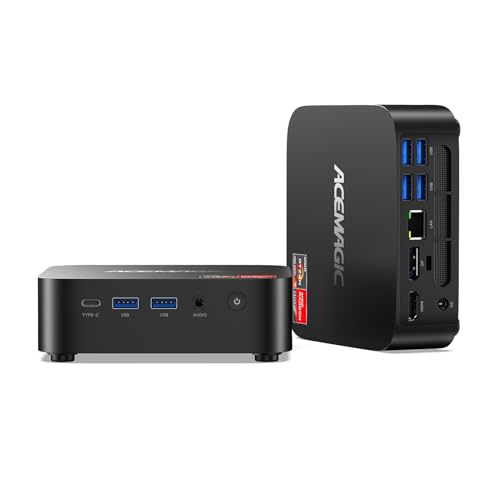
Verdict: The M1 is the all-rounder of the ACEMAGIC lineup. It uses AMD's Ryzen 7 7735HS, an 8-core, 16-thread processor that ACEMAGIC lists at up to 4.75 GHz, with Radeon 680M graphics, 24 GB of fast LPDDR5 memory and a 1 TB drive in the version linked here. Three 4K screens, 2.5 Gbps Ethernet and two M.2 slots round it out. It costs less than the X3 and M5, and for office work, programming, photo editing and older or lighter games it covers most needs.
Key specs
- Processor: AMD Ryzen 7 7735HS, 8 cores / 16 threads, Zen 3+ on TSMC 6 nm, 3.2 GHz base, up to 4.75 GHz, 16 MB L3 cache
- Graphics: AMD Radeon 680M, 12 graphics cores, up to 2,200 MHz
- Memory: 24 GB (2 × 12 GB) LPDDR5-5500 on the board, not expandable
- Storage: 1 TB M.2 2280 NVMe PCIe 3.0 ×4 drive; two M.2 2280 slots that accept PCIe 3.0 or 4.0 NVMe drives (no SATA), up to 4 TB
- Displays: HDMI 2.0, DisplayPort 1.4 and USB-C (DP 1.4), each listed at 4K 60 Hz
- Ports: two 10 Gbps USB-A on the front, four 5 Gbps USB-A on the back, one 10 Gbps USB-C, 3.5 mm audio
- Network: 2.5 Gbps Ethernet, Wi-Fi 6, Bluetooth 5.2
- Cooling: aluminum heatsink with an 80 mm fan listed at 2,000+ RPM, dual air outlets
- Power: 19 V / 3.42 A adapter
- Size: 128.2 × 128.2 × 41 mm
- In the box: mini PC, power adapter, HDMI cable, VESA mount, screws, manual
- System: Windows 11 Pro; ACEMAGIC lists Ubuntu and Linux as compatible
What stands out
Strong graphics for the price. The Radeon 680M was one of AMD's best integrated graphics chips of its generation. It's a clear step up from Intel's UHD graphics in the M5, V1 and K1, and comfortably handles 4K video, photo editing and many lighter or older games at modest settings.
Fast memory, plenty of it. 24 GB of LPDDR5-5500 is a generous amount for a mid-priced mini PC, and the higher speed helps the integrated graphics, which share system memory.
Two drive slots. Both M.2 slots accept NVMe drives, so you can add a second SSD for games, photos or backups. ACEMAGIC lists support for PCIe 4.0 drives in the slots, though the included drive is PCIe 3.0.
2.5 Gbps Ethernet. That's faster than the Gigabit port on the M5, V1 and K1, and useful if you copy files to a NAS or have multi-gig internet.
Mount it out of sight. A VESA mount comes in the box, so the M1 can sit on the back of a monitor and keep the desk clear.
What to watch
Memory is fixed. The LPDDR5 is soldered, and ACEMAGIC states it isn't expandable. 24 GB is plenty for most home and office use, but if you expect to need 64 GB, the M5 with standard slots is the better route.
Configurations vary. ACEMAGIC's German page lists the M1 with 16 GB, 24 GB or 32 GB of memory and a 512 GB or 1 TB drive, and ACEMAGIC's US page also shows a Ryzen 7 6800H version with 32 GB LPDDR5-6400. This page covers the 7735HS version with 24 GB and 1 TB. Check the processor, memory and drive on the product page before you order.
No USB4. The fastest port is 10 Gbps USB-C. If you want a 40 Gbps port for fast external drives or a dock, the X3 has one.
Wi-Fi 6, not 6E. The M1 lacks the 6 GHz band that the M5 and X3 support. For most homes that's a small difference.
Noise isn't published. ACEMAGIC lists the fan speed but no decibel figure.
Who it's for
- Home offices that want three monitors and plenty of memory
- Students and programmers who need a solid all-purpose machine
- Light gamers and photo editors on a mid-range budget
- Anyone with a NAS or multi-gig internet who wants 2.5 Gbps Ethernet
Who should look elsewhere
- Gamers who want the strongest integrated graphics: choose the X3
- Heavy multitaskers who need more cores or upgradable memory: choose the M5
- Buyers who only browse, stream and type: the V1 is far cheaper
Setup tips
Mount the M1 with the included VESA bracket if your monitor supports it, but leave space around the air outlets. To add a second drive, use an NVMe SSD; SATA drives aren't supported. For three screens, connect one each to HDMI, DisplayPort and USB-C, and make sure your USB-C cable or monitor carries DisplayPort video.
Bottom line
The M1 is the safest middle choice in ACEMAGIC's range: eight fast cores, solid Radeon 680M graphics, 24 GB of memory, 2.5 Gbps Ethernet and two NVMe slots in a compact case with a VESA mount. Step up to the X3 for gaming and USB4, or to the M5 for raw core count, but for most home and office desks the M1 is enough.