
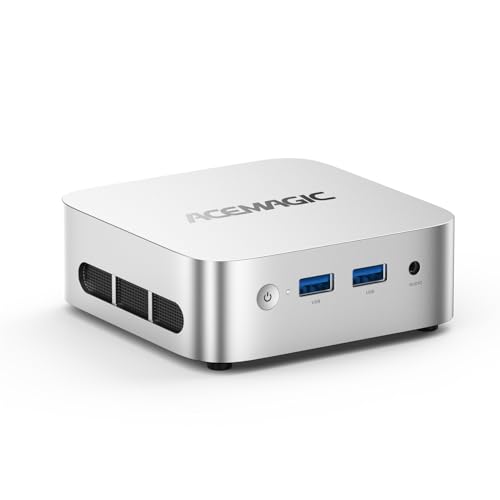
Verdict: The V1 is ACEMAGIC's smallest and simplest mini PC in this lineup. ACEMAGIC lists it at 100 × 100 × 33 mm, with Intel's 4-core Twin Lake N150 processor, Wi-Fi 6, two 4K outputs and Windows 11 Pro. The version linked here comes with 16 GB of memory and a 512 GB drive. It's built for browsing, email, documents, video calls and streaming, and it's small enough to hide behind a monitor or TV. It isn't meant for gaming or heavy editing, and it has fewer ports than ACEMAGIC's larger models.
Key specs
- Processor: Intel N150 (Twin Lake), 4 cores / 4 threads, Intel 7 process, 0.8 GHz base, up to 3.6 GHz, 6 MB cache
- Graphics: Intel Graphics, 24 execution units, up to 1.0 GHz
- Memory: 16 GB DDR4 in this version; one SO-DIMM slot, up to 16 GB (slot supports modules up to DDR4-3200)
- Storage: 512 GB M.2 2280 drive in this version; one M.2 2280 slot that accepts NVMe PCIe 3.0 or SATA drives, up to 2 TB
- Displays: HDMI 2.0 and DisplayPort 1.4, each listed at 4K 60 Hz, for two screens
- Ports: two 10 Gbps USB-A on the front, two USB 2.0 on the back, Gigabit Ethernet, 3.5 mm audio
- Wireless: Wi-Fi 6 and Bluetooth 5.2
- Power: 12 V / 2.5 A adapter (30 W)
- Size: 100 × 100 × 33 mm
- System: Windows 11 Pro
What stands out
Truly tiny. At 100 mm square and 33 mm tall, the V1 is smaller than the 128 mm cases of the K1, M1, X3 and M5. It fits on a bookshelf, behind a TV or on the back of a monitor, and its small power adapter suits shared or crowded desks.
Low power draw. The N150 is a low-power chip, and ACEMAGIC pairs it with a 30 W adapter. For a machine that stays on all day for office work, a kiosk or a home media setup, that's an efficient choice.
Two 4K screens. HDMI and DisplayPort each drive a 4K 60 Hz display, which covers most dual-monitor office setups.
A modern Wi-Fi radio. Wi-Fi 6 and Bluetooth 5.2 are a step up from the Wi-Fi 5 and Bluetooth 4.2 in the K1, and they make it easier to keep keyboards, mice and headphones connected.
Windows 11 Pro included. Pro adds features such as BitLocker drive encryption and Remote Desktop hosting, which are handy for small offices.
What to watch
Four cores, four threads. The N150 is designed for light work. It's fine for office apps, web browsing and video, but large spreadsheets, photo editing and many open browser tabs at once will feel slower than on the K1 or M1. It's not a gaming machine.
Memory and storage limits. There's a single memory slot with a 16 GB maximum, which this version already fills, and a single M.2 slot. You can swap the drive for a larger one, up to 2 TB, but you can't add a second internal drive.
The drive type may be SATA. ACEMAGIC's UK spec table lists the included drive as an M.2 SATA SSD, and the UK table lists the included memory at DDR4-2666. The slot supports faster NVMe drives, so you can upgrade storage speed later. Expect SATA-level speed from the drive it ships with.
Few fast ports. Only two USB-A ports run at 10 Gbps; the other two are USB 2.0, and there's no USB-C. If you connect many fast drives or a USB-C monitor, choose a larger model.
Other versions exist. ACEMAGIC also sells the V1 with an Intel N95 or N97 processor and different memory and storage. This page covers the N150 version with 16 GB and 512 GB. Check the processor on the product page before you order.
Who it's for
- Home offices and students who mainly use a browser, email and documents
- Small businesses that need a quiet, low-power front-desk or kiosk PC
- Families who want a small PC for homework, streaming and video calls
- Anyone setting up a compact media PC behind a TV
Who should look elsewhere
- Light gamers and editors: the M1 or X3 have far stronger graphics
- People who want three monitors or more ports: the K1 has six USB-A ports and USB-C
- Anyone who needs more than 16 GB of memory
Setup tips
Use the HDMI and DisplayPort outputs for a two-screen setup, and plug fast drives into the blue front ports, which are the 10 Gbps ones. Keep the USB 2.0 ports for a keyboard, mouse or receiver. If you replace the drive, an NVMe PCIe 3.0 SSD will be noticeably faster than the SATA drive ACEMAGIC lists for the UK version.
Bottom line
The V1 is the ACEMAGIC mini PC for simple, everyday computing in the smallest possible space. It does browsing, office work and streaming on very little power and fits almost anywhere. If you need more speed, more ports or a third screen, step up to the K1 or M1.