
Mini PC for Emulation: Which ACEMAGIC Handles What
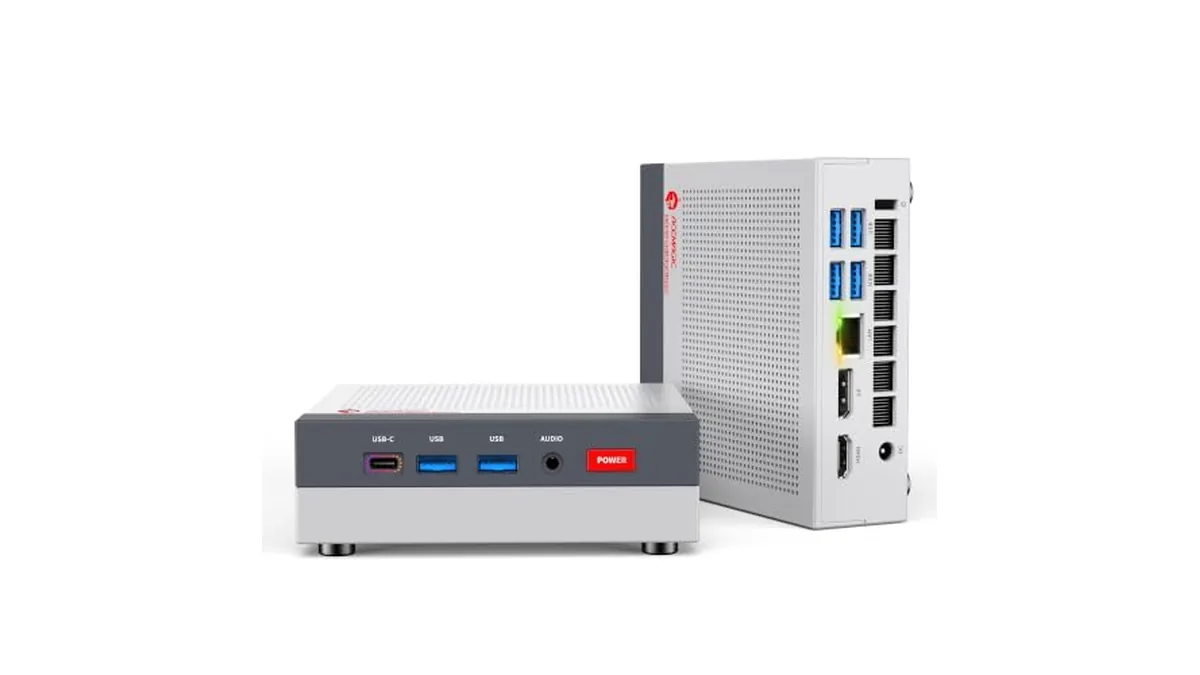
Emulation load varies wildly: a 2D library barely asks anything of a modern chip, while later 3D systems lean on the graphics side. In this ACEMAGIC lineup the ACEMAGIC X3 is the graphics-focused box, with Radeon 780M integrated graphics, the strongest built-in GPU the product pages here assign to any model we cover. The notes below use published CPU, GPU, and memory facts only. They are capability bands, not frame rates from a session on this desk.
What the X3 publishes
ACEMAGIC lists an AMD Ryzen 7 H 255: 8 cores and 16 threads, Zen 4 on a 4 nm process, 3.8 GHz base, up to 4.9 GHz, 16 MB L3 cache, and up to 54 W. Graphics are Radeon 780M with 12 compute units, up to 2,600 MHz. Memory is 16 GB or 24 GB LPDDR5 soldered to the board (US pages list 6,400 MT/s) and is not upgradable, so the size you pick at checkout is the size you keep. Storage starts at a 512 GB or 1 TB PCIe 4.0 NVMe drive, with two M.2 2280 PCIe 4.0 slots that ACEMAGIC rates up to 4 TB.
Display outputs are HDMI 2.1, DisplayPort 2.0, and USB4, for up to three screens. ACEMAGIC lists 8K 60 Hz or 4K 120 Hz. The front USB4 Type-C port runs at 40 Gbps and, on ACEMAGIC’s US table, offers up to 100 W of power delivery. Other ports include two 10 Gbps USB-A on the front, four 5 Gbps USB-A on the back, and a 3.5 mm audio jack. Networking is 2.5 Gbps Ethernet, Wi-Fi 6E, and Bluetooth 5.2. Cooling uses dual fans with two copper heat pipes. The case measures 128.2 × 128.2 × 44 mm (5.05 × 5.05 × 1.73 in) and ships with Windows 11 Pro.
ACEMAGIC states that this Ryzen 7 H 255 does not include an NPU. That matters only if you care about on-device features that need a dedicated accelerator; it is not an emulation score. Fan noise is not published. The X3 also belongs to the Retro X series, with a classic-console-inspired case, which is a design choice if the box will sit under a TV.
Capability bands, not scores
Published pages do not list emulator names or frames per second. Treat the following as a way to match those specs to common workload shapes.
Older 2D systems and many less demanding titles are a CPU-light job on an 8-core/16-thread Zen 4 chip. Any current ACEMAGIC mini PC in this range is in the conversation for that band. The reason to pick the X3 here is not that those titles require 780M; it is that you may later add heavier 3D software without changing boxes.
Mid-weight 3D emulation is where integrated graphics start to matter. ACEMAGIC pitches the X3 for games, video editing, and 3D work, and calls 780M a step up from the Radeon 680M in the ACEMAGIC M1 and far beyond the Intel graphics in the M5, V1, and K1. If your library includes GPU-sensitive 3D systems, the X3 is the lineup pick because it has the strongest iGPU on these pages. That is a relative statement, not a promise that a given title will feel smooth.
High-demand modern console emulation is the band this article will not grade. Those projects depend on the emulator build, the title, and settings you choose. The published X3 sheet does not include those results, so check the emulator’s current hardware notes against Radeon 780M, 16 or 24 GB of LPDDR5, and an 8-core CPU before you assume this box is enough.
Memory, storage, and a living-room hookup
Because memory is soldered, decide between 16 GB and 24 GB before you order. Emulators, overlays, and a browser open at the same time add up; 24 GB is the safer pick if you keep many systems installed at once. You cannot add RAM later. If upgradable memory is the priority and graphics are not, ACEMAGIC points heavier multitaskers toward the ACEMAGIC M5 (16 processor cores, standard memory slots) and notes that the ACEMAGIC K1 also uses upgradable memory. The ACEMAGIC V1 is the budget office option in that same comparison. ACEMAGIC M5 vs X3 and ACEMAGIC RAM upgrade spell out those trade-offs.
Storage is easier to grow. The second M.2 2280 PCIe 4.0 slot is the place for a library of games you own. USB4 at 40 Gbps can also drive a fast external SSD or a dock. For a TV setup, HDMI 2.1 or DisplayPort 2.0 can feed a 4K 120 Hz screen; USB4 can take a third display. 2.5 Gbps Ethernet helps if your files live on a NAS.
Controllers usually want a reliable USB or Bluetooth path. The X3 lists Bluetooth 5.2 plus plenty of USB-A ports, so a wired pad does not have to fight a dongle for the only open jack.
Who should pick something else
Choose another model if you need to add RAM later, want the most CPU cores in this lineup (the M5’s 16), or only need a cheap office box (the V1). Choose the X3 if graphics headroom, USB4, and modern display outputs are the point, including light-to-moderate PC gaming at modest settings, which is how ACEMAGIC itself frames the 780M.
The ACEMAGIC review and Performance Mini PCs collect the rest of the range. Buy the X3 for the published 780M and the soldered memory size you actually need, and judge demanding emulators against those specs instead of against a score this page does not have.